
Scenario: Email Migration
In many carve-outs, an email migration must be carried out as part of the separation from the parent company. This involves transferring data such as emails, calendar entries, contacts, notes, etc. from the seller’s email system to the carve-out object’s email system. Various scenarios are considered for migration to the Microsoft 365 cloud.
Tenant-to-Tenant Migration:
In many cases, Microsoft 365 is already used in various forms on the seller’s side. To separate the data, it must be moved within the Microsoft Cloud from the tenant of the divesting unit to a new tenant. Since Microsoft initially did not provide its own tools for data migration, third-party tools had to be used. Examples include Power365 by BinaryTree or MigrationWiz by BitTitan, which have already been successfully used in carve-out projects by digatus. License fees per user must be paid for these tools. In some cases, there are additional costs for extended features such as OneDrive or SharePoint migrations.
Meanwhile, Microsoft’s Fast Track specialists also support data migration. However, this support is only available for a minimum order of 500 licenses. With the support of migration tools, it is possible to carry out the data transition largely in the background, as the data synchronization can begin several weeks before the actual transition date. Shortly before the transition date, the final data is synchronized and access to the new mailbox is enabled. In our experience, it makes sense to perform the final data reconciliation during off-peak hours, e.g., on weekends.
The major advantage of tenant-to-tenant migration is that the data is already in the Microsoft Cloud and does not need to be transferred from a local server to the cloud via an internet connection. The impact on users is very minimal in this scenario.
On-Premises Exchange Server – Exchange Online
Local Exchange servers with various version levels are still widely used. In these cases, the transition to Microsoft’s cloud email service (Exchange Online) is somewhat more complex. Since the mailbox data is stored locally in one or more data centers, it must first be uploaded to the cloud via an internet connection. Depending on the size of the mailboxes to be migrated, bandwidth bottlenecks may occur during data transfer. This either leads to the migration of mailboxes being carried out in several phases, or users starting with empty mailboxes in the first step, with data being transferred gradually.
Non-Microsoft (e.g., GSuite, Notes)
There are special requirements when migrating email systems from other manufacturers such as GSuite from Google or Notes from HCL. In such cases, we work with specialized companies, as sometimes additional services like workflows need to be migrated as well.
Another option is to provide users with empty mailboxes. In this case, data from the old systems would either need to be archived and made accessible to users or migrated by the users themselves.
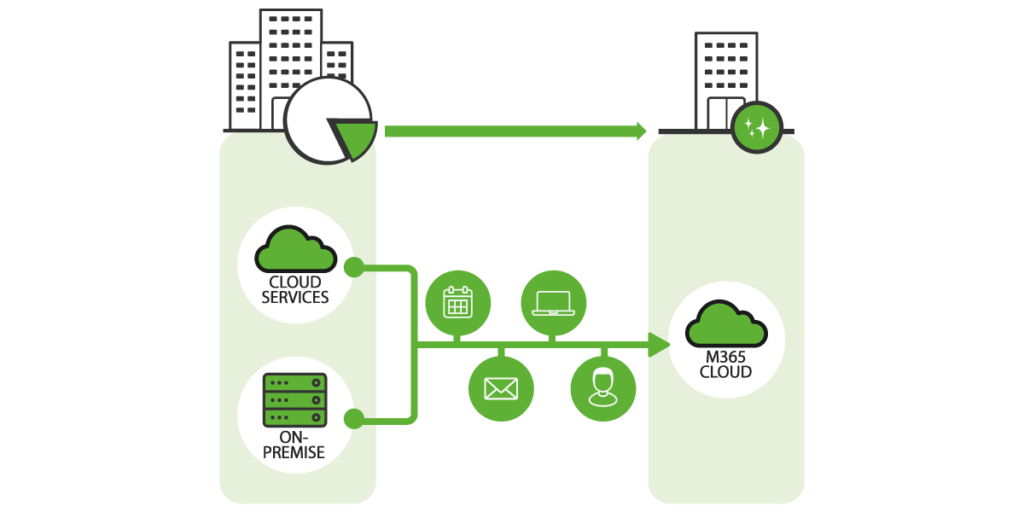
Microsoft 365 Solutions in the Context of Carve-Out Scenarios
Scenario: OneDrive
If OneDrive is used as part of the Microsoft 365 suite, the data must also be migrated here. There are various options for migrating the data: For larger numbers of users, the use of third-party tools (see Email Migration) makes sense. For 50 users or fewer, it sometimes makes sense to have the users perform the data migration themselves. In this case, it has proven effective to provide appropriate instructions and implement a suitable support structure, e.g., a special hotline number for migration support.
Scenario: Microsoft Teams
Microsoft Teams has become increasingly prevalent in companies. It is a digital hub that combines communication, content, assigned tasks, and apps in one place and is already integrated into the Microsoft 365 suite. With the growing popularity of the application, solutions must also be developed for carve-out scenarios to separate and ultimately migrate the target’s data. It’s important to know that, for example, chat data cannot be migrated. However, it is possible to migrate individual teams and their associated data. Since it is time-consuming, complicated, and therefore expensive to separate the data between seller and target, it usually makes sense in carve-out projects not to centrally migrate this data and instead start with a new, empty setup.
The use of Teams for telephony adds additional complexity to migration projects. Basically, there is the option to connect Teams to a telephone system or to use Microsoft’s Cloud PBX functionality.
If Teams is connected to a telephone system, further dependencies arise (e.g., porting of phone numbers, contact center solutions, call forwarding, group switching, etc.), which significantly increase the complexity. Therefore, it makes sense to consider the transition of telephony in a separate sub-project and, if possible, postpone it to a later date.
If Microsoft Cloud PBX functionality is already being used, it must be clarified with the seller’s side whether the phone numbers can be transferred or if it is necessary to assign new phone numbers. In some cases, it makes sense to start directly with new phone numbers, which also significantly simplifies the transition process.
Scenario: SharePoint, Yammer, Planner, OneNote, PowerBI, etc.
As part of the Microsoft 365 suite, a variety of additional services are offered, such as SharePoint, Yammer, Planner, OneNote, PowerBI, etc. These all require their own strategies and approaches and must be considered individually. A more in-depth examination would go beyond the scope of this article.
Scenario: Rebranding
It is not uncommon for the target company to be renamed as part of a carve-out project, as the spin-off from the parent company creates a new entity that appears on the market with its own identity. As part of our IT carve-out projects, we accompanied, for example, the Gemini Rail Group and GRANOVIT SA through this process. An elementary part of such a rebranding is changing email addresses. This activity can be easily combined with the migration of the email system. Again, there are a variety of different cases, which mainly depend on what agreement has been made with the parent company regarding the use of the old email addresses. For example, it is possible that:
- a forwarding is set up from the old to the new email address
- a so-called autoresponder is activated, which automatically responds to incoming messages with a preset text
- or the old email address continues to be used in the new email system
In all described cases, support from the divesting unit in setting up is absolutely necessary. Additionally, care must be taken to ensure that the new domain is reserved in time and that there is a possibility to manage it. [/artikel_text][artikel_text headline=”Herausforderungen”]
The challenges described below apply to all scenarios.
First and foremost is the quality of the provided data. Without a proper data foundation, a successful migration is not possible. It is crucial to identify the users and their associated accounts and clearly assign them to the target. Only then is it possible to migrate the correct data.
The previously mentioned quantity of data should also not be overlooked. In a cloud migration, data transfer always occurs over an internet connection. This must be appropriately sized to transfer the amount of data in the shortest possible time. It is not uncommon to deal with data volumes in the range of several terabytes.
An additional challenge is the support provided by the seller. This is essential to provide the data on one hand and to make changes to the existing configuration on the other, e.g., adjusting email routing, deleting old email addresses, setting up forwarding, etc. Ideally, the support services are defined in a Transitional Service Agreement (TSA) concluded between the seller and buyer.
Conclusion
Often, after a successful carve-out, companies become significantly smaller and especially more dynamic when they are separated from complex corporate structures and their IT environment. The use of Microsoft 365 can help them to act flexibly and quickly, as it offers both the necessary stability and security and can be easily scaled if needed. Due to this adaptability to company developments, Microsoft 365 is well-suited as a solution in carve-outs.